







CMP-COLOR UCCNC SUITE
POST PROCESSOR FOR FUSION AND UCCNC
FOR MANUAL TOOL CHANGE AND 4th ROTARY AXIS
 Why do we need a better Post Processor ?
While Autodesk Fusion and UCCNC are both excellent software packages that are relatively easy to learn, the connection between Fusion and UCCNC relies on a post processor that is not necessarily optimized in its original form. Many useful features remain hidden, and even something as simple as a manual tool change with tool probing initially requires solid programming knowledge to edit UCCNC macros and achieve a reliable workflow.
Many users give up when faced with this unnecessary level of complexity. To eliminate these issues, I felt it was worthwhile to develop a post processor specifically designed for UCCNC users with little or no programming experience. There are no M6 or M31 macros to edit anymore—everything is handled directly by the post processor.
Based on the assumption that the user performs manual tool changes and has a permanently mounted fixed tool probe on the machine table, the post processor allows all the required parameters to be configured easily:
- Manual tool change position (X, Y and Z)
- Fixed tool probe position (X and Y)
- Tool probing parameters (fast feed rate, slow feed rate, probing distance, retract distance, and probe height)
The G53 safe retract command, especially when a rotary axis is used, often causes unexpected issues. To solve this, I added a configurable G53 safe retract height to the post processor, eliminating the problems commonly encountered in this situation.
I also added support for a 4th rotary axis, including the ability to define custom spindle safe retract coordinates, as well as optional pauses before and after each indexed rotation. This allows the operator to remove and replace a support block beneath the workpiece.
When machining flexible materials, it is common practice to place a support block under the workpiece to prevent deformation and reduce vibration during machining.
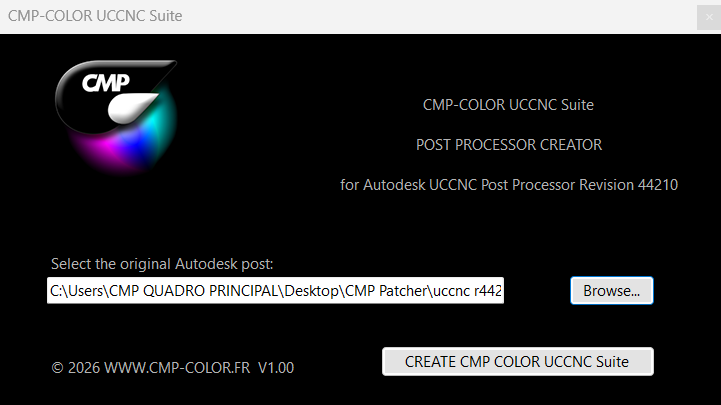
The post processor interface has been completely redesigned, making it far more intuitive and better suited to UCCNC:
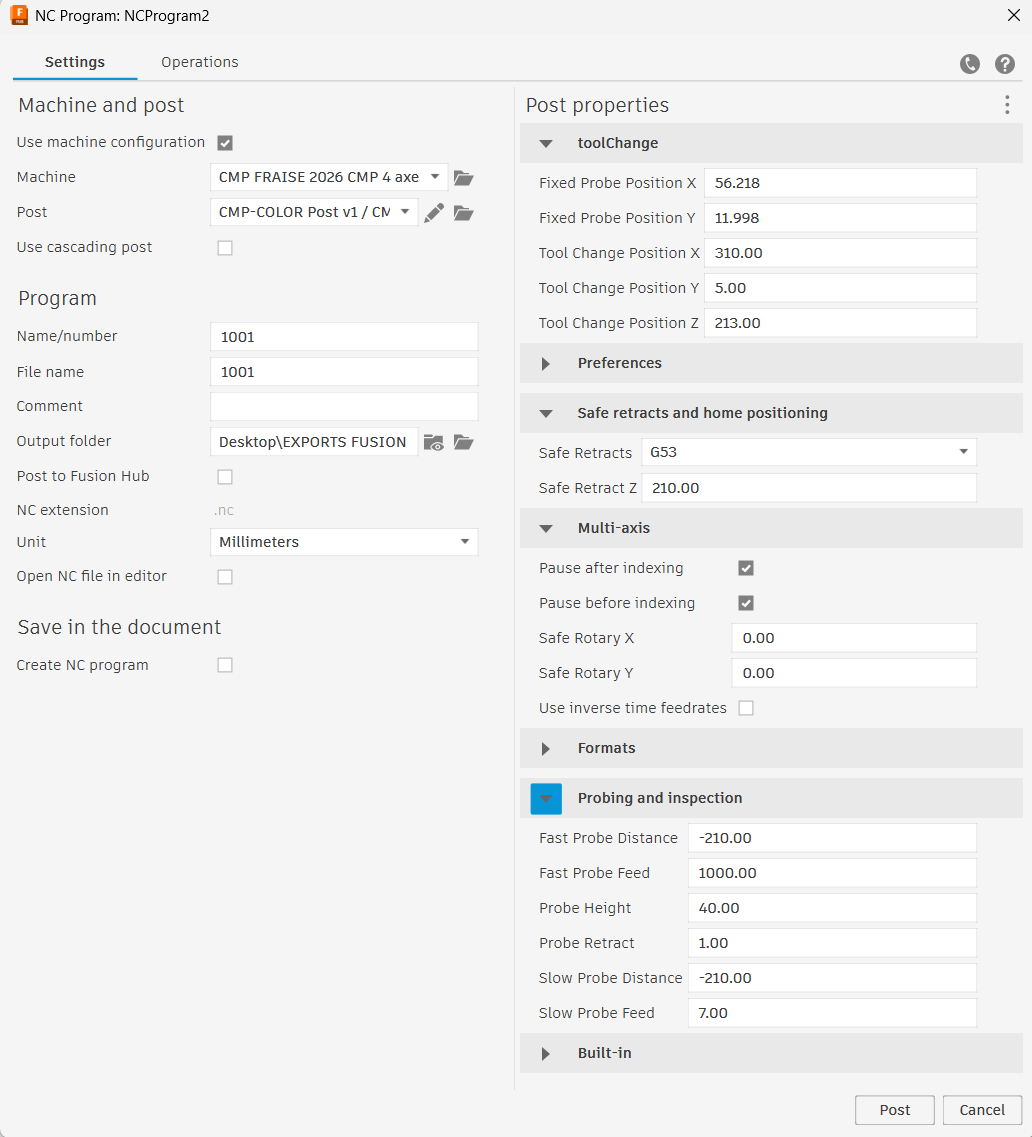
CMP-COLOR UCCNC SUITE INTERFACE
These settings are then written into the G-code as a small block of approximately fifteen lines and are used by the custom macros we have developed. The result is a UCCNC environment that is significantly easier to use, safer, and completely transparent to the operator.
Installation takes about 15 minutes: simply copy the supplied files to the locations specified in the CMP-COLOR UCCNC Suite User Manual. Once the installation is complete, no further configuration is required, as all the necessary parameters are automatically transferred through the G-code.
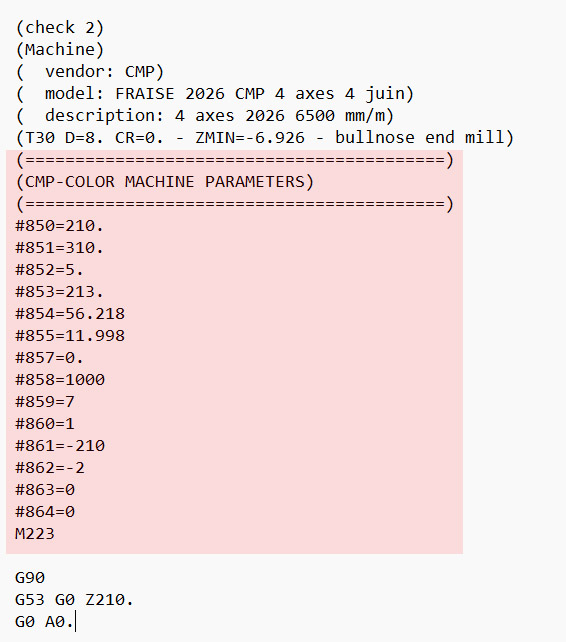
The section highlighted in red contains the code responsible for managing the CMP Suite parameters.
These parameters are automatically generated in the machining G-code, then read and applied transparently during execution.
No user intervention is required.
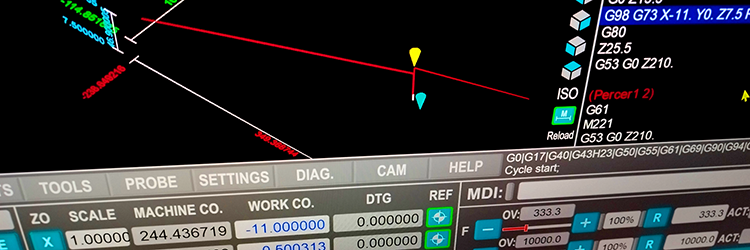
CMP-COLOR UCCNC Suite File Overview
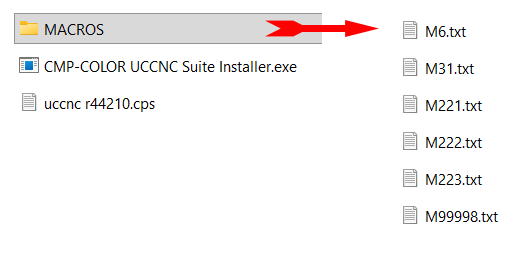
The CMP-COLOR UCCNC Suite includes the following files:
The macros required for proper operation.
The installer, which acts as a patcher.
The original free autodesk/CCNC post processor, which is patched to complete the CMP-COLOR UCCNC Suite installation.
The CMP post processor is based on the official post processor, which is protected by copyright and owned by Autodesk and UCCNC. As a result, I cannot sell the original post processor itself. You can find generic Autodesk post processor for your machine on autodesk website, free to download.
However, I am fully entitled to distribute and sell a patch that adds new functionality to the original post processor. For this reason, the CMP-COLOR UCCNC Suite is distributed as a patch that enhances the original post processor, rather than as a modified version of the original file. For convenience, the original Autodesk/UCCNC post processor, which is publicly available for download from the Autodesk website, is included with the CMP-COLOR UCCNC Suite.
Using the CMP-COLOR UCCNC Suite
Using the CMP-COLOR UCCNC Suite is extremely straightforward because, from the user's perspective, nothing changes:
After starting UCCNC, simply perform the homing cycle, install the cutting tool, measure the tool length, set the workpiece offsets, and load the G-code generated by Autodesk Fusion using the CMP-COLOR post processor. You are then ready to start machining. Everything else is handled automatically, making the entire process transparent, simple, and reliable for the user.
Nothing changes… or does it?
Actually, it changes a lot. You no longer need to edit macros and there is no need to spend hours editing macros (such as M6 and M31) or risk damaging your machine due to configuration errors.
The configurable G53 safe retract height allows you to use G53 reliably and without the issues commonly encountered with the original post processor.
The system is robust, easy to configure, and simple to fine-tune. It also provides full support for a 4th rotary axis, including both indexed and continuous machining, with configurable pauses and a safe spindle position during indexed rotations.
Finally, clear on-screen messages guide the operator through each required action, making the entire machining process more intuitive and user-friendly.
Manual Tool Change and Probing Features
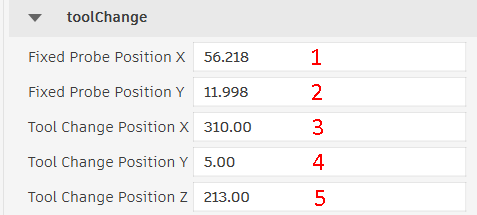
When an M6 command is encountered, the spindle moves to the tool change position ( 3, 4, and 5 in the Post ).For convenience, choose a position where the tool is easily accessible for manual tool changes. Once confirmed, the spindle moves to the probing position defined by parameters 1 and 2 in the post processor. ALL VALUES ARE IN MACHINE COORDINATES
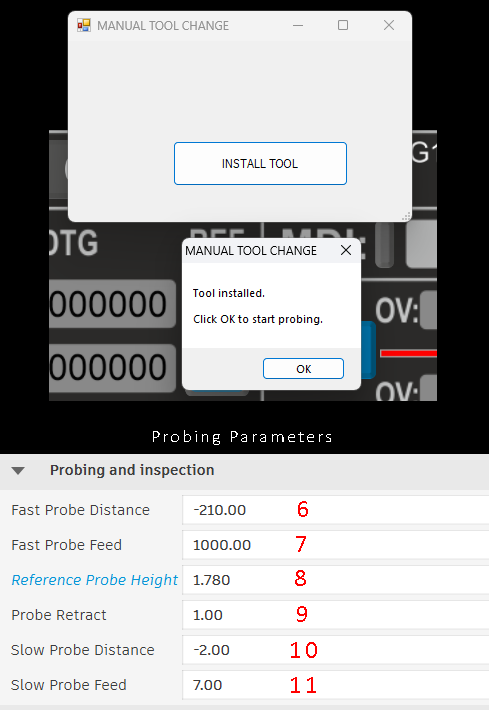
The probing parameters are as follows:
6. Fast Probe Distance: This is the maximum downward probing distance. It defines how far the spindle will travel downward from the Safe Retract Z position in search of the touch probe.This value must be large enough to ensure that the tool makes contact with the probe. This Value must be negative
7. Fast Probe Feed: The spindle feed rate used during the fast probing move In most cases, a feed rate of approximately 1000 mm/min provides good results
8. Reference Probe Height: Manually determine this value by probing the spindle with no tool installed. This value is used to calculate the actual tool length and the Z offset.
9. Probe Retract: After the fast probing move and once the tool has contacted the probe, the spindle retracts by the Probe Retract distance before performing a slower, more accurate probing cycle. In most cases, a retract distance of 2 mm is sufficient to clear the probe and reset the probe contact before the final probing move. This value must be positive
10. Slow Probe Distance: After retracting by the Probe Retract distance, the spindle moves downward again to perform the slow, high-precision probing cycle. Slow Probe Distance defines the maximum travel allowed during this slow probing move. It should always be greater than the Probe Retract distance. For example, if Probe Retract is set to 2 mm, a Slow Probe Distance of -4 mm is recommended. This value must be negative
11. Slow Probe Feed: This is the spindle feed rate used during the slow probing cycle. Keep in mind that the slower the probing speed,the more accurate the measurement will be. The same principle applies to your machine's homing speed. As a general recommendation, we use a slow probing feed rate of 7 mm/min.
Once the probing cycle is complete, the new tool length offset is stored in UCCNC and G-code execution continues
Safe Rectract and G53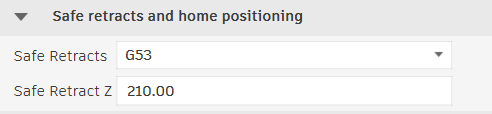
In Fusion 360 and the standard UCCNC post processor, rotary axis moves force the use of G53 for all safe retract moves (the Clearance Height parameter is ignored). The CMP-COLOR post processor allows you to specify the Safe Retract Z position used for these Safe Retracts moves. As a general recommendation, set this value to the highest Z machine coordinate your machine can safely reach. THIS VALUE IS ALWAYS IN MACHINE COORDINATES
4th Rotary Axis Features
When using a rotary axis, it is common practice to place a support block beneath the workpiece to prevent deformation and reduce vibration during machining. The drawback is that this support block prevents the workpiece from rotating.
If you enable Pause Before Indexing and Pause After Indexing, the CMP-COLOR UCCNC Suite automatically detects indexed rotations in the G-code and inserts a pause both before and after each indexed movement. This allows you to remove the support block before the rotation and reposition it afterward, ensuring safe and uninterrupted machining.
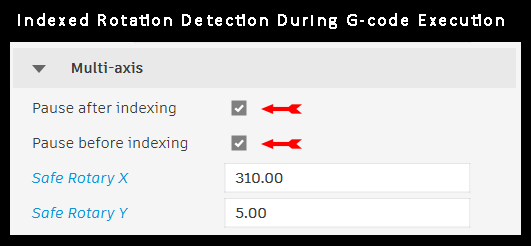
CMP-COLOR UCCNC Suite automatically detects indexed rotations in the G-code. When an indexed rotation is encountered, the program pauses and moves the spindle to the predefined safe position before the rotationis performed. You are then prompted to remove the support block frombeneath the workpiece. Safe rotary X and Y are in machine coordinates
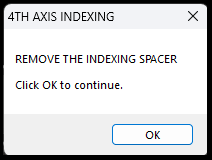
The machine performs the indexed rotation
after which you are prompted to reposition the support block
beneath the workpiece before machining resumes.
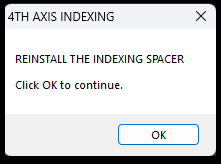
Once confirmed, the machining operation
resumes automatically.
Pricing
We have chosen a competitive price of €64.50 for the CMP-COLOR UCCNC Suite. Once your PayPal payment has been received, you will receive, via WeTransfer, all the files required for installation, along with the User Manual, within 24 hours.
|
CMP-COLOR UCCNC Suite |
|
The CMP-COLOR UCCNC Suite has been tested with Autodesk Fusion version 2.0.2704.1.15 and UCCNC version 1.2115
Required to use the CMP-COLOR UCCNC Suite:
Autodesk Fusion (any license)
Up-to-date UCCNC software
3-axis or 4-axis CNC milling machine (rotary fourth axis)
Fixed touch probe installed on the milling machine table
Copyright(c) 2026 christophe métairie photographie. Tous droits réservés